⚠️ Important
- A factory reset will erase all configuration, including SIP accounts, network settings, and paired handsets.
- Only proceed if instructed (e.g. by Redcentric support).
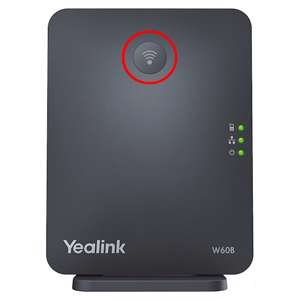
To factory reset your Yealink W70B DECT base station, you can use either the physical paging button or the connected handset’s menu.
Method 1: Using the Physical Button (Hard Reset)
- Unplug the power supply (or Ethernet cable if using PoE) from the W70B base station.
- Press and hold the physical Paging button on the front of the base.
- Continue holding the button and plug the power (or Ethernet) back in.
- Keep holding the button until all three LED lights turn solid green.
- Release the Paging button.
- Wait 5–10 minutes for the base station to complete the reset and fully reboot
Method 2: Using a Registered Handset
If you have a paired handset and know the PIN, you can reset the base without needing physical access to the unit.
- Press the OK button on your connected DECT handset to open the main menu.
- Navigate to Settings > System Settings > Base Reset.
- Enter the base PIN (default is
0000) and press Done. - Select Reset to factory and confirm your choice.
- The base will automatically restart